
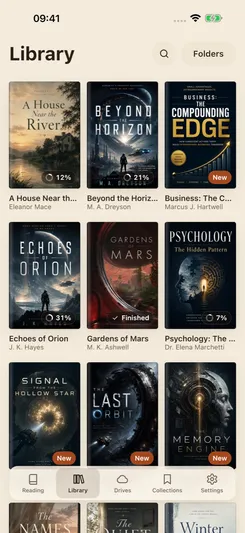
Library and Drives
Library shows books from all connected sources. Drives shows the individual files and folders on each source.
Libra processes a file before adding its book to Library. A file that is still being processed can appear in Drives under its filename before it appears in Library.
Find and open a book
Open Library and tap the search button. Enter at least three characters. Search results include matches in titles, authors, descriptions and series. Tap a book to read it; press and hold a book to open its details.
The view menu lets you change the display and grouping. Grouping options include Folders, Author / Series, Series and Genres / Author / Series. These groups use the information stored in the book file.
Create a collection
- Open a book’s details and select Collections. In the reader’s compact menu, this tab may be labelled Lists.
- Tap Add collection, enter a name and confirm.
- Tap a collection’s row to add or remove the book. A checkmark indicates membership. A book can belong to several collections.
Open the Collections tab to browse your collections. Membership does not move the book file or change its folder in cloud storage.
Libra also provides automatic groups such as Unread, Reading and Finished. These reflect the book’s reading state rather than a list you edit manually.
Track reading status
The Reading tab shows books in progress and finished books. Open a book to continue from its saved position.
To set a book’s status manually, open its details and use Mark as read or Mark as unread in Overview.
Add a rating or review
In the book’s Overview tab, use Add review to enter a star rating or your own text, then tap Save. Libra also offers a rating prompt when you finish a book.
Ratings and reviews are personal records in your library. They are not published to an online review service.
The same book on several sources
If the same book file is stored on your device and in a connected cloud folder, Library shows one book. Its details list the available copies; Drives shows each file in its own source.
Libra identifies books by their content, not just by title and author. Different editions, modified files, or EPUB and PDF versions of the same title can be separate books, with separate reading progress and notes.